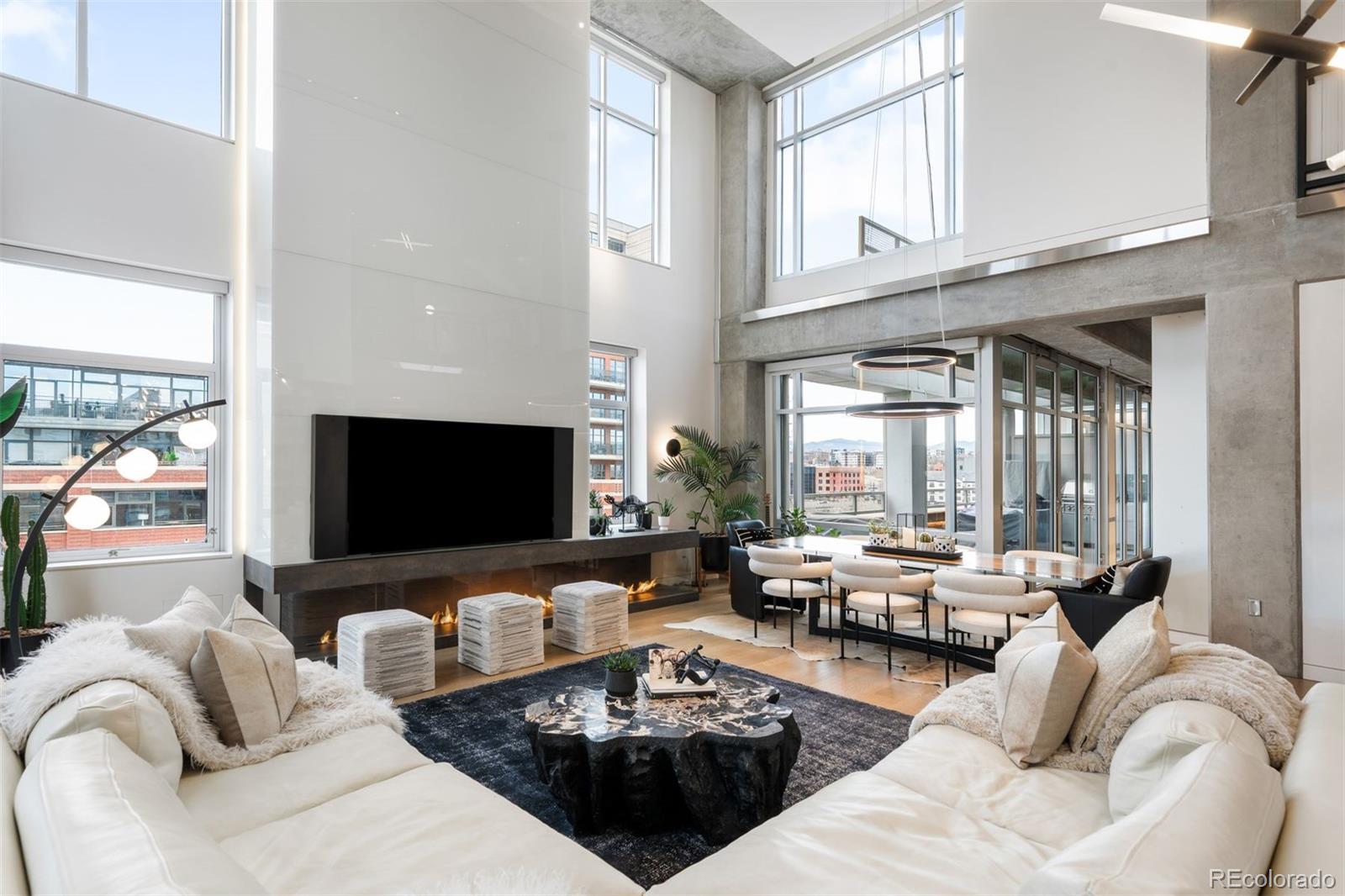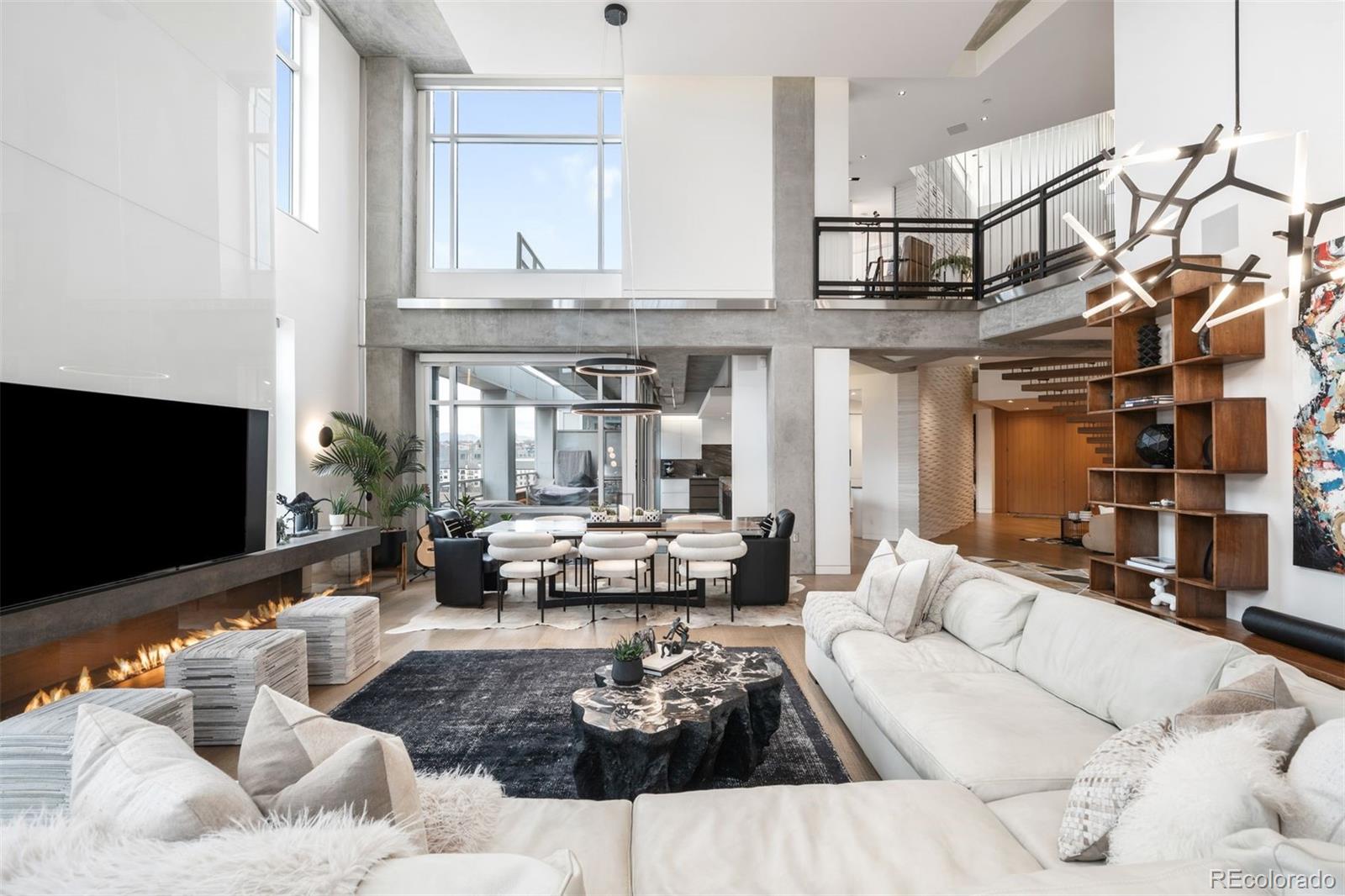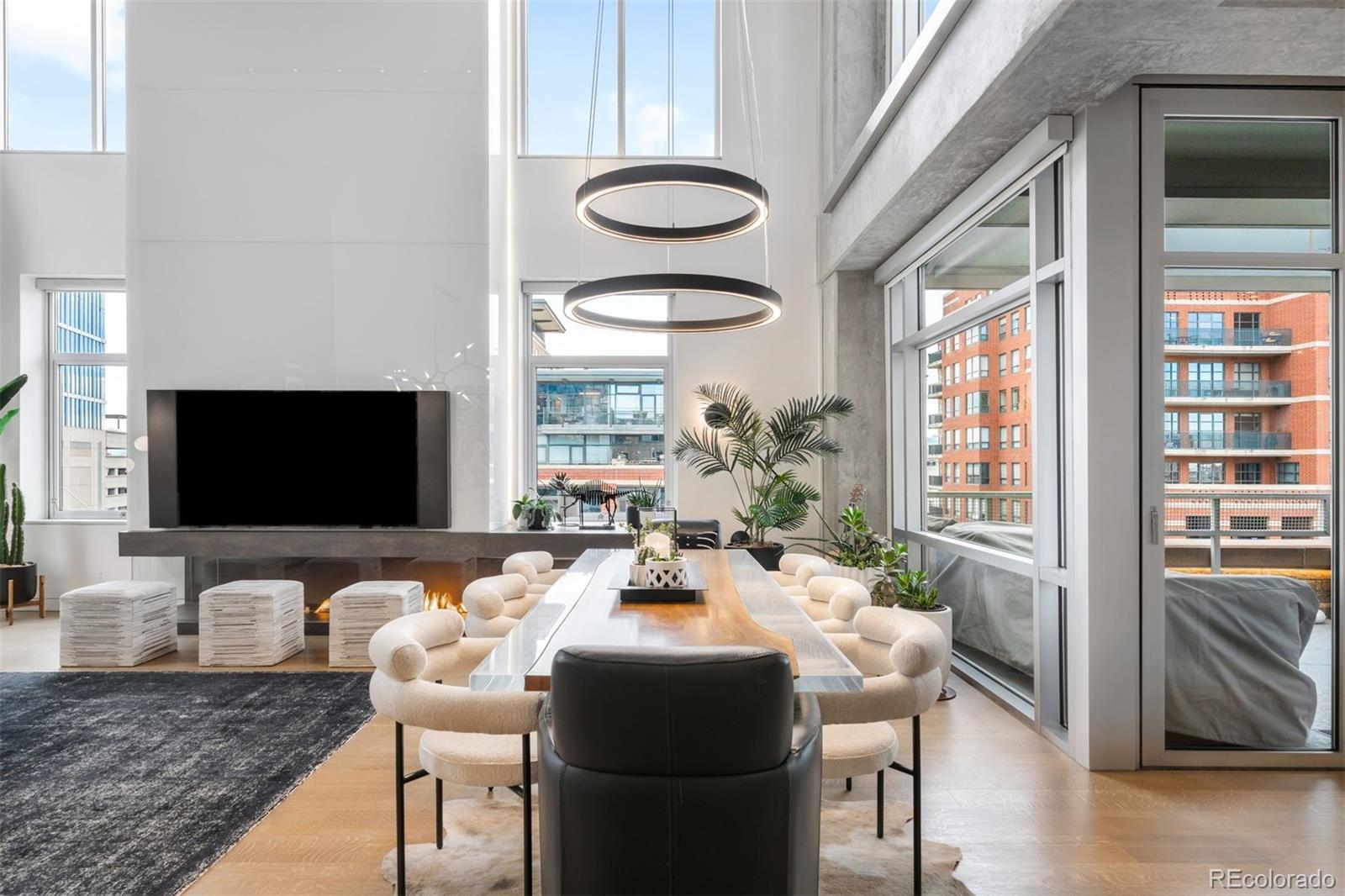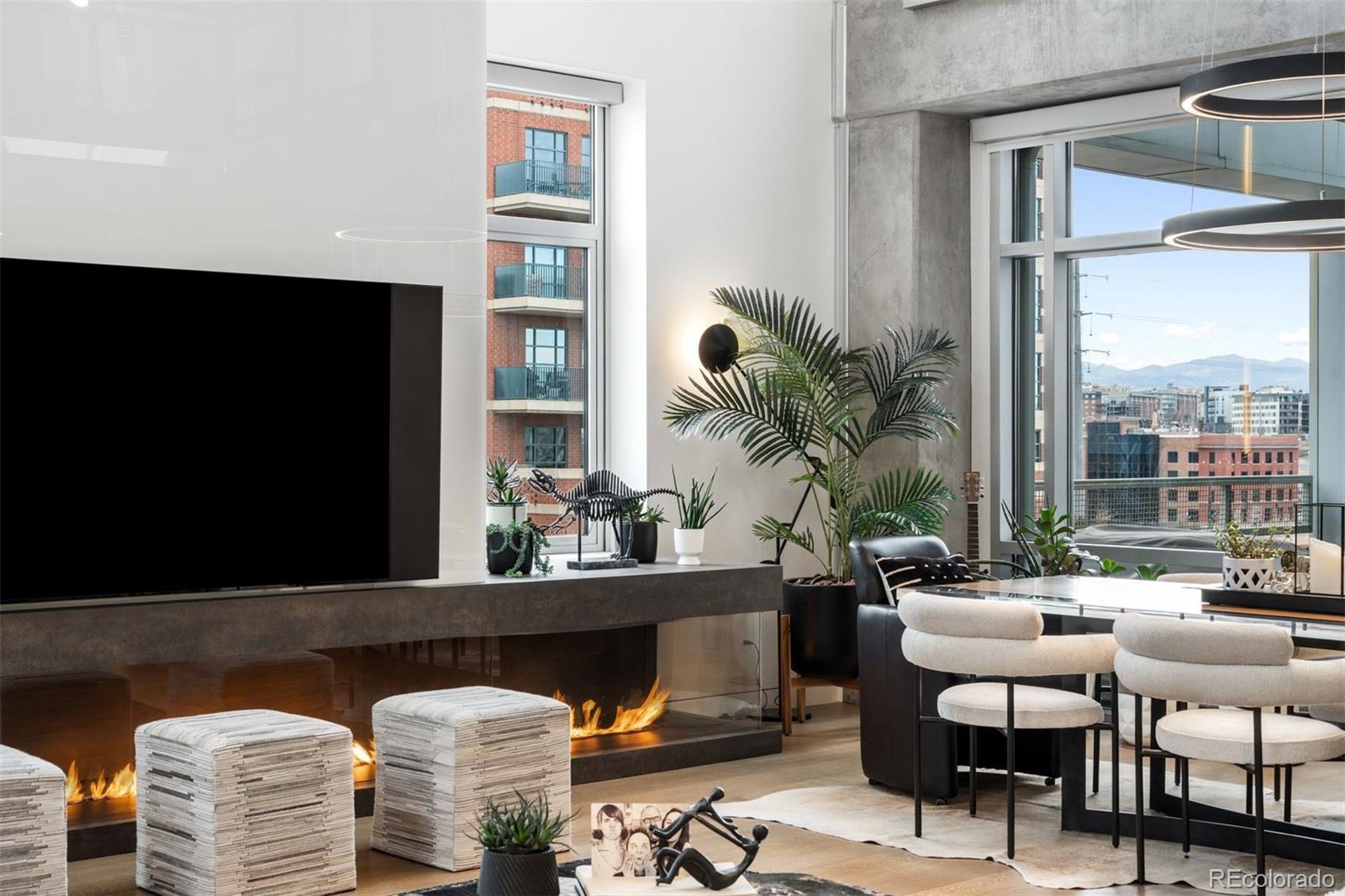

Perched atop one of the most desirable buildings in Downtown Denver, Penthouse 6 is a rare opportunity to own a custom-designed, multi-level residence in the heart of Riverfront Park, arguably the city’s most walkable neighborhood. Encompassing over 4,000 square feet of artfully curated interiors, this penthouse offers a rare blend of architectural sophistication, privacy, and sweeping mountain-to-city views that frame every living space. Completely reimagined with no expense spared, the residence is anchored by a showstopping chef’s kitchen with Miele appliances, a built-in espresso machine and steamer, and striking leathered granite waterfall countertops, all flowing seamlessly onto a private terrace ideal for al fresco dining. The soaring living room impresses with a bespoke 12ft glass fireplace, a rock climbing wall, designer wall tile, and floor-to-ceiling windows. Additional main-floor highlights include a chic guest suite, a custom powder room, a cozy reading lounge beneath the architectural staircase, and a full-sized laundry room. Upstairs, the serene primary suite is a true sanctuary with a private balcony, spa-like five-piece bath, sauna, custom walk-in closet, and an additional washer/dryer. Two additional bedrooms and a loft lounge with outdoor access complete the upper level. This is the only residence in the building to offer a fully private rooftop deck, creating an exceptional outdoor retreat complete with a hot tub and sweeping panoramic views. The home is powered by a Savant automation system, giving you full control of lighting, climate, and media from your phone. Includes three oversized deeded garage spaces in a secure, heated building. Residents enjoy professional management, premium amenities, and direct access to Commons Park, Confluence Park, Union Station, Larimer Square, the Ballpark District, and Denver’s best dining and cultural venues. A lifestyle of elegance, privacy, and connection to the city’s very best.
Level - UpperDescription - A spa-like sanctuary with a rain shower, deep soaking tub, custom-designed closet, in-suite laundry, and a private sauna for ultimate relaxation
Bathroom Half
Level - MainDescription - Main floor powder bath
Bathroom Three Quarter
Level - UpperDescription - En-suite 3/4 bath
Bedroom
Dimensions - 12 x 8Level - UpperDescription - A light-filled bedroom with custom wood accent wall, dual windows, and an en-suite bath for ultimate comfort and privacy
Dining Room
Level - MainDescription - Airy and elegant, the dining space is anchored by oversized windows and designer lighting, offering the perfect setting for formal gatherings or casual entertaining
Family Room
Dimensions - 31 x 24Level - MainDescription - Cozy lounge nook beneath the floating staircase with sculptural seating and warm designer finishes—perfect for reading or unwinding.
Kitchen
Dimensions - 26 x 22Level - MainDescription - Fully remodeled chef’s kitchen with top-of-the-line Miele appliances, including a built-in espresso maker, steamer oven, icemaker, and four refrigerator drawers. Features custom glass cabinetry, waterfall granite countertops, dual sinks, and direct access to a private terrace with mountain and city views
Dimensions - 17 x 16Level - MainDescription - A dramatic double-height living room with a sleek fireplace, custom rock-climbing wall, and statement lighting, all framed by floor-to-ceiling windows
Loft
Dimensions - 14 x 12Level - UpperDescription - A stylish and intimate loft lounge with direct outdoor access
Save
Ask
Tour
Hide
Share
Exterior Features
Construction Details
BrickConcreteMetal Siding
Exterior
BalconyGas GrillLighting
Lot Features
Near Public Transit
Patio And Porch
CoveredDeckPatio
Roof
OtherTar/Gravel
Spa
Yes
View
CityMountain(s)
Waterview
CityMountain(s)
Community Features
Association Amenities
Elevator(s)ParkingSecurity
Association Dues
1636
Financing Terms Available
CashConventionalVA Loan
HOA Fee Frequency
Monthly
Roads
Paved
School District
Denver 1
Schools
School District
Denver 1
Elementary School
Greenlee
Middle School
Strive Westwood
High School
West
Listing courtesy of LIV Sotheby's International Realty [email protected]
The content relating to real estate for sale in this Web site comes in part from the Internet Data eXchange ("IDX") program of METROLIST, INC., DBA RECOLORADO real estate listings held by brokers other than LIV Sotheby's International Realty are marked with the IDX Logo. This information is being provided for the consumers' personal, non-commercial use and may not be used for any other purpose. All information subject to change and should be independently verified.
Neighborhood & Commute
Source: Walkscore
Disclosure: Community information and market data powered by Constellation Data Labs. Information is deemed reliable but not guaranteed.
This mode enables people with epilepsy to use the website safely by eliminating the risk of seizures that result from flashing or blinking animations and risky color combinations.
Visually Impaired Mode
Improves website's visuals
This mode adjusts the website for the convenience of users with visual impairments such as Degrading Eyesight, Tunnel Vision, Cataract, Glaucoma, and others.
Cognitive Disability Mode
Helps to focus on specific content
This mode provides different assistive options to help users with cognitive impairments such as Dyslexia, Autism, CVA, and others, to focus on the essential elements of the website more easily.
ADHD Friendly Mode
Reduces distractions and improve focus
This mode helps users with ADHD and Neurodevelopmental disorders to read, browse, and focus on the main website elements more easily while significantly reducing distractions.
Blindness Mode
Allows using the site with your screen-reader
This mode configures the website to be compatible with screen-readers such as JAWS, NVDA, VoiceOver, and TalkBack. A screen-reader is software for blind users that is installed on a computer and smartphone, and websites must be compatible with it.
Online Dictionary
Readable Experience
Content Scaling
Default
Text Magnifier
Readable Font
Dyslexia Friendly
Highlight Titles
Highlight Links
Font Sizing
Default
Line Height
Default
Letter Spacing
Default
Left Aligned
Center Aligned
Right Aligned
Visually Pleasing Experience
Dark Contrast
Light Contrast
Monochrome
High Contrast
High Saturation
Low Saturation
Adjust Text Colors
Adjust Title Colors
Adjust Background Colors
Easy Orientation
Mute Sounds
Hide Images
Virtual Keyboard
Reading Guide
Stop Animations
Reading Mask
Highlight Hover
Highlight Focus
Big Black Cursor
Big White Cursor
Text to Speech
Navigation Keys
Accessibility Statement
barticgroup.com
April 4, 2026
Compliance status
We firmly believe that the internet should be available and accessible to anyone, and are committed to providing a website that is accessible to the widest possible audience,
regardless of circumstance and ability.
To fulfill this, we aim to adhere as strictly as possible to the World Wide Web Consortium’s (W3C) Web Content Accessibility Guidelines 2.1 (WCAG 2.1) at the AA level.
These guidelines explain how to make web content accessible to people with a wide array of disabilities. Complying with those guidelines helps us ensure that the website is accessible
to all people: blind people, people with motor impairments, visual impairment, cognitive disabilities, and more.
This website utilizes various technologies that are meant to make it as accessible as possible at all times. We utilize an accessibility interface that allows persons with specific
disabilities to adjust the website’s UI (user interface) and design it to their personal needs.
Additionally, the website utilizes an AI-based application that runs in the background and optimizes its accessibility level constantly. This application remediates the website’s HTML,
adapts Its functionality and behavior for screen-readers used by the blind users, and for keyboard functions used by individuals with motor impairments.
If you’ve found a malfunction or have ideas for improvement, we’ll be happy to hear from you. You can reach out to the website’s operators by using the following email [email protected]
Screen-reader and keyboard navigation
Our website implements the ARIA attributes (Accessible Rich Internet Applications) technique, alongside various different behavioral changes, to ensure blind users visiting with
screen-readers are able to read, comprehend, and enjoy the website’s functions. As soon as a user with a screen-reader enters your site, they immediately receive
a prompt to enter the Screen-Reader Profile so they can browse and operate your site effectively. Here’s how our website covers some of the most important screen-reader requirements,
alongside console screenshots of code examples:
Screen-reader optimization: we run a background process that learns the website’s components from top to bottom, to ensure ongoing compliance even when updating the website.
In this process, we provide screen-readers with meaningful data using the ARIA set of attributes. For example, we provide accurate form labels;
descriptions for actionable icons (social media icons, search icons, cart icons, etc.); validation guidance for form inputs; element roles such as buttons, menus, modal dialogues (popups),
and others. Additionally, the background process scans all of the website’s images and provides an accurate and meaningful image-object-recognition-based description as an ALT (alternate text) tag
for images that are not described. It will also extract texts that are embedded within the image, using an OCR (optical character recognition) technology.
To turn on screen-reader adjustments at any time, users need only to press the Alt+1 keyboard combination. Screen-reader users also get automatic announcements to turn the Screen-reader mode on
as soon as they enter the website.
These adjustments are compatible with all popular screen readers, including JAWS and NVDA.
Keyboard navigation optimization: The background process also adjusts the website’s HTML, and adds various behaviors using JavaScript code to make the website operable by the keyboard. This includes the ability to navigate the website using the Tab and Shift+Tab keys, operate dropdowns with the arrow keys, close them with Esc, trigger buttons and links using the Enter key, navigate between radio and checkbox elements using the arrow keys, and fill them in with the Spacebar or Enter key.Additionally, keyboard users will find quick-navigation and content-skip menus, available at any time by clicking Alt+1, or as the first elements of the site while navigating with the keyboard. The background process also handles triggered popups by moving the keyboard focus towards them as soon as they appear, and not allow the focus drift outside of it.
Users can also use shortcuts such as “M” (menus), “H” (headings), “F” (forms), “B” (buttons), and “G” (graphics) to jump to specific elements.
Disability profiles supported in our website
Epilepsy Safe Mode: this profile enables people with epilepsy to use the website safely by eliminating the risk of seizures that result from flashing or blinking animations and risky color combinations.
Visually Impaired Mode: this mode adjusts the website for the convenience of users with visual impairments such as Degrading Eyesight, Tunnel Vision, Cataract, Glaucoma, and others.
Cognitive Disability Mode: this mode provides different assistive options to help users with cognitive impairments such as Dyslexia, Autism, CVA, and others, to focus on the essential elements of the website more easily.
ADHD Friendly Mode: this mode helps users with ADHD and Neurodevelopmental disorders to read, browse, and focus on the main website elements more easily while significantly reducing distractions.
Blindness Mode: this mode configures the website to be compatible with screen-readers such as JAWS, NVDA, VoiceOver, and TalkBack. A screen-reader is software for blind users that is installed on a computer and smartphone, and websites must be compatible with it.
Keyboard Navigation Profile (Motor-Impaired): this profile enables motor-impaired persons to operate the website using the keyboard Tab, Shift+Tab, and the Enter keys. Users can also use shortcuts such as “M” (menus), “H” (headings), “F” (forms), “B” (buttons), and “G” (graphics) to jump to specific elements.
Additional UI, design, and readability adjustments
Font adjustments – users, can increase and decrease its size, change its family (type), adjust the spacing, alignment, line height, and more.
Color adjustments – users can select various color contrast profiles such as light, dark, inverted, and monochrome. Additionally, users can swap color schemes of titles, texts, and backgrounds, with over 7 different coloring options.
Animations – epileptic users can stop all running animations with the click of a button. Animations controlled by the interface include videos, GIFs, and CSS flashing transitions.
Content highlighting – users can choose to emphasize important elements such as links and titles. They can also choose to highlight focused or hovered elements only.
Audio muting – users with hearing devices may experience headaches or other issues due to automatic audio playing. This option lets users mute the entire website instantly.
Cognitive disorders – we utilize a search engine that is linked to Wikipedia and Wiktionary, allowing people with cognitive disorders to decipher meanings of phrases, initials, slang, and others.
Additional functions – we provide users the option to change cursor color and size, use a printing mode, enable a virtual keyboard, and many other functions.
Browser and assistive technology compatibility
We aim to support the widest array of browsers and assistive technologies as possible, so our users can choose the best fitting tools for them, with as few limitations as possible. Therefore, we have worked very hard to be able to support all major systems that comprise over 95% of the user market share including Google Chrome, Mozilla Firefox, Apple Safari, Opera and Microsoft Edge, JAWS and NVDA (screen readers), both for Windows and for MAC users.
Notes, comments, and feedback
Despite our very best efforts to allow anybody to adjust the website to their needs, there may still be pages or sections that are not fully accessible, are in the process of becoming accessible, or are lacking an adequate technological solution to make them accessible. Still, we are continually improving our accessibility, adding, updating and improving its options and features, and developing and adopting new technologies. All this is meant to reach the optimal level of accessibility, following technological advancements. For any assistance, please reach out to [email protected]